Conditional Access erlaubt es einem IdP Autorisierung an mehr Parameter als nur ein korrektes Passwort und MFA zu binden. Es berücksichtig z.B. auch den Gerätestatus und Kontext. Jumpcloud erlaubt neu, dies in Verbindung mit CrowdStrike zu tun. Wie das geht und alle Details dazu im folgenden.
.png?width=2441&height=1725&name=Architektur%20Workshop%20Template%20-%20Jumpcloud%20(2).png)
Worum es hier geht
- Wir integrieren Jumpcloud als IdP und MDM mit CrowdStrike
- Wir vereinfachen sichern den Zugang zu Unternehmensressourcen auf Basis von Zero Trust und koppeln ihn an mehrere Bedingungen
Wie es geht
Die Integration ist denkbar einfach, darum ist dies vermutlich der kürzeste Know-How Artikel den ich je geschrieben habe. In Jumpcloud haben wir die folgenden Attribute als erweiterten Kontext für die Conditional Access Policy zur Auswahl:
- Device Management
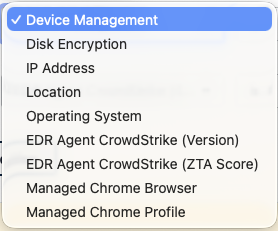
- Disk Encryption
- IP Address
- Location
- Operating System
- EDR Agent CrowdStrike (Version)
- EDR Agent CrowdStrike (ZTA Score)
- Managed Chrome Browser
- Managed Chrome Profile
Ich kann dabei in einer Policy auch mehrere Conditions auswählen und diese entweder "OR" oder "AND" verknüpfen, was mir mehr flexibilität erlaubt. Hier haben wir zum Beispiel unsere interne Policy, welche 4 Checks grundsätzlich durchführt, bevor sie einem user Zugriff auf unseren Tenant gibt. Die Gruppenzuordnung für spezifische Appplikationen werden dabei in Jumpcloud direkt in der Application geregelt.
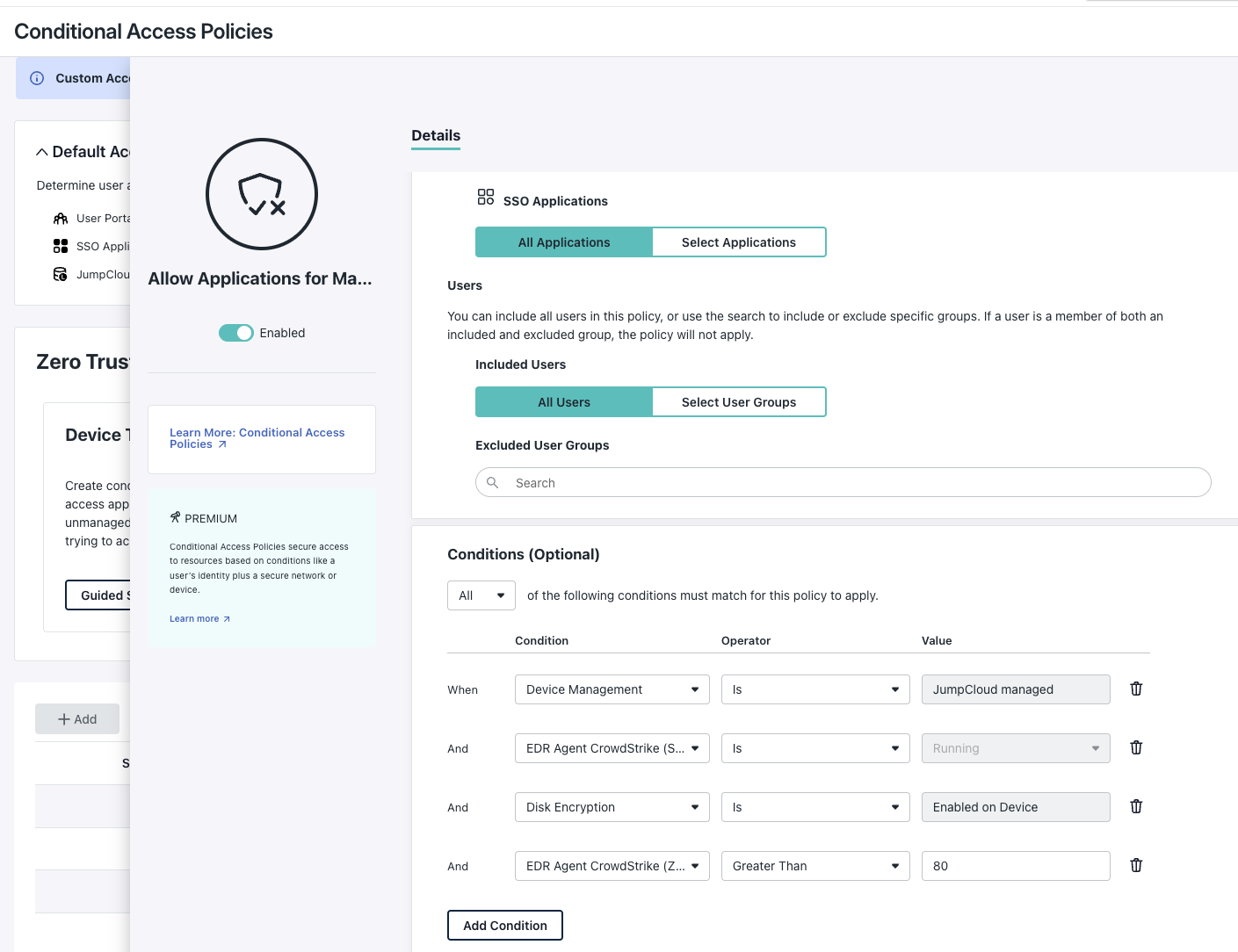
Wie man hier sieht, prüfen wir einerseits, ob der Benutzer von einem Jumpcloud managed Gerät kommt, ob seine Festplatte verschlüsselt ist und ob CrowdStrike läuft und der aktuelle (live) ZTA Score (je höher desto sicherer) höher als 80 ist. Erst dann bekommt ein User überhaupt nur Zugriff auf unseren IdP. Die genaue App-Zuordnung wird dann in einem zweiten Schritt geprüft und direkt der Applikation zugeordnet.
Damit die CrowdStrike integration funktioniert, muss man nichts tun, ausser sicherstellen, dass die Geräte sauber über Jumpcloud Go (der Agent) enrolled sind. Der Agent liesst dann auf den Geräten selbst den Score und Status aus und leitet ihn an Jumpcloud live weiter.
Insgesamt ein extrem einfach und komfortabel zu konfigurierender Conditional Access. Je mehr ich mit Jumpcloud arbeite, deste mehr mag ich das Produkt. Es öffnet mir immer mehr die Augen, wie überkompliziert und Umständlich Microsoft mit Intune eigentlich agiert. Genau diese einfachkeit macht Jumpcloud aus, und genau diese ist es auch die eine gesunde Security-Baseline wirklich lebbar macht.