With version 10.1.X, UniFi is focusing even more strongly on the topic of reliability. In addition to many detailed improvements, the update brings a new high-availability page, finer control over VPNs, better logs and convenience features for Wi-Fi and hotspot operation. It will be particularly exciting in combination with the new Enterprise Campus Aggregation Switch (ECS Aggregation) and the 5G solutions.
What's new about the API - and why it's strategically important
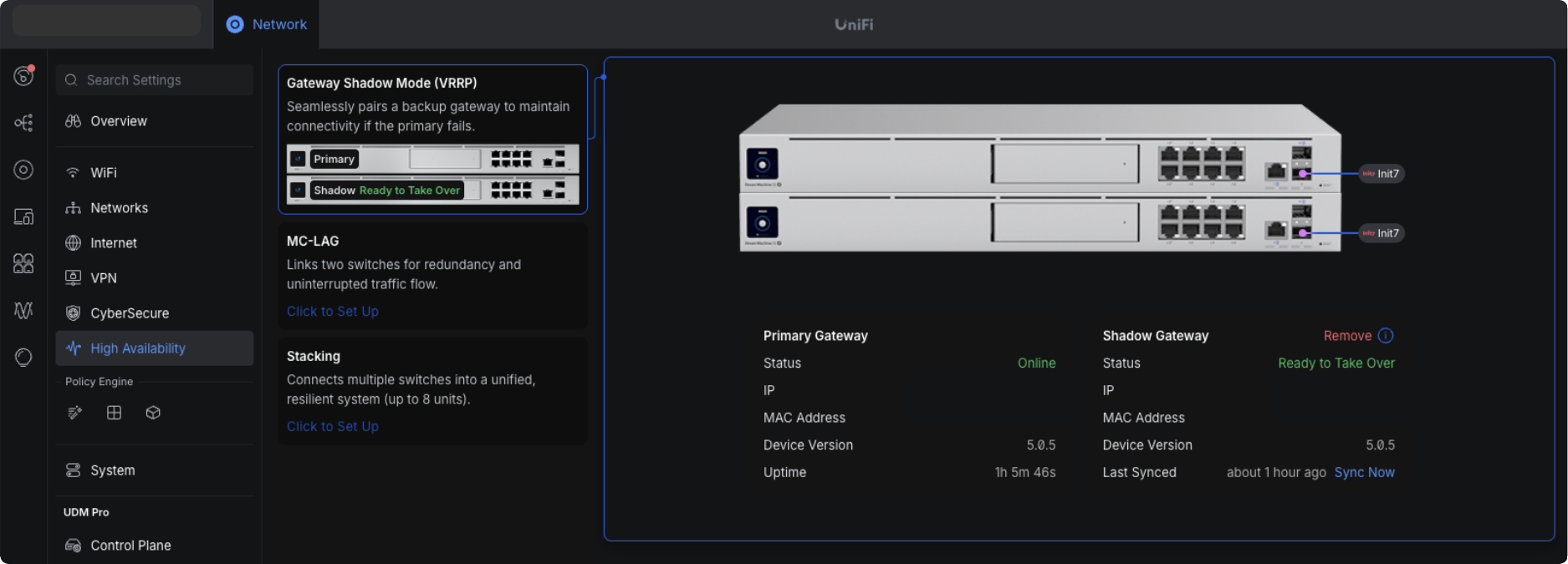
The "High Availability" menu item in UniFi Network is new. Behind it are three building blocks for fail-safe corporate networks:
- Gateway Shadow Mode (VRRP)
Enterprise Fortress gateways work in an active/passive network: If the primary device fails, the shadow gateway takes over automatically - controlled via VRRP and with transfer of the existing sessions. This means that the failure remains practically invisible to users. - MC-LAG with the ECS aggregation switch
Multi-Chassis Link Aggregation (MC-LAG) connects two ECS aggregation switches to form a logical pair. Several lines are used simultaneously to achieve redundancy and load balancing: If a port, a link or even an entire switch fails, the traffic continues to run via the remaining connections. - Briefly explained: What is stacking?
Stacking combines several physical switches so that they behave like a single large switch - with a common configuration and a management interface. This increases port capacity and bandwidth without making management more complex and creates additional redundancy.
These functions create an end-to-end redundancy chain from the gateway to the aggregation and access layer. This reduces the risk of network outages, simplifies maintenance windows (failover to the shadow, then update) and creates reserves for growth without redrawing the network architecture.
More control over VPNs, WAN and backup connections
10.1.X brings several improvements to VPN and WAN infrastructure:
-
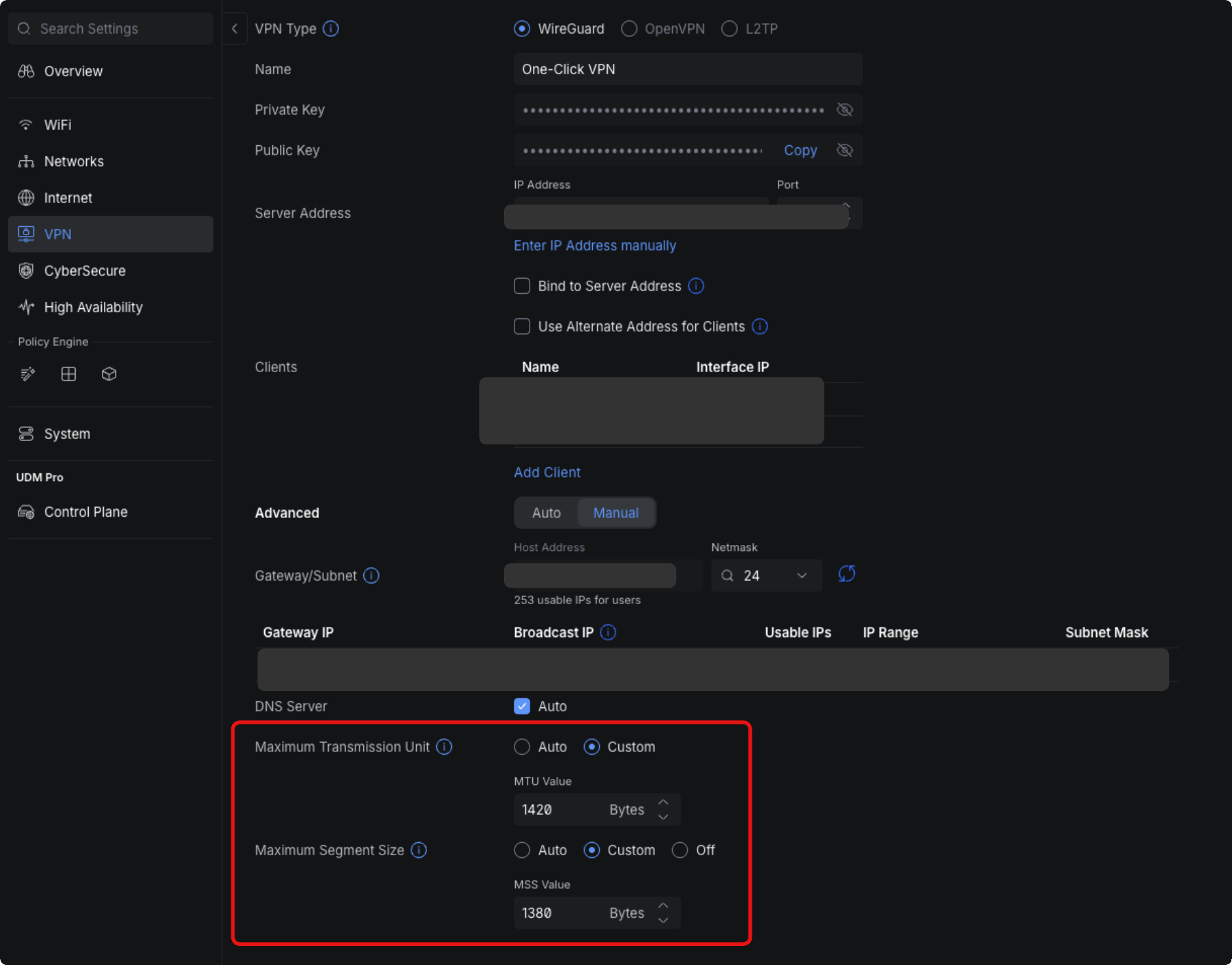
MTU/MSS per VPN server and client
The application now allows MTU/MSS values to be defined directly on VPN servers and clients. This helps to mitigate fragmentation problems over certain provider routes - a common stumbling block for site-to-site connections or home office connections. -
VPN overview via API
VPN servers and site-to-site tunnels can now be listed via the official API. This is ideal for automatically documenting existing VPNs or integrating them into external monitoring and CMDB systems. -
Better multi-WAN handling and Starlink integration
The dashboard view for installations with multiple WAN links has been revised. In addition, UniFi now shows Starlink firmware statuses and obstructions directly in the dashboard - helpful when Starlink serves as a backup internet. -
Finer logs for 5G products - including UniFi 5G Max
The system logs have been improved for 5G devices. This fits perfectly with the new UniFi 5G Max, an up to 3.4 Gbps 5G modem with dual SIM/eSIM, which is adopted directly into UniFi via PoE and supports automatic failover scenarios.
Enterprise benefits:
VPN parameters can be adapted more precisely to difficult lines, backup paths (5G, Starlink, multi-WAN) are monitored more transparently, and setups can be documented reproducibly via the API - important for compliance, audits and clean operating processes.
Logs, hotspot and administration: faster to the root cause
10.1.X also makes life easier for administrators:
-
Search in all areas of the system logs
The logs can now be searched in all sections; filtering has also been expanded with device, client and admin filters. This makes it easier to see which client, device or administrator triggered a change - particularly helpful for incident handling or change reviews. -
Improved system logs for 5G products
Events relating to 5G modems (e.g. connection changes, network losses) are recorded more clearly. This makes it easier to prove whether a failure was WAN- or LAN-related. -
Hotspot vouchers with sorting and bugfix
The voucher table in the hotspot module can now be sorted; in addition, a bug has been fixed where the "Add Voucher" button for hotspot operators was sometimes not available. Guest WLAN scenarios - for example in hotels, restaurants or schools - can now be operated in a more structured way. -
Tidy settings
Network lists and RADIUS servers have been logically moved to the network settings, while AirTime charts have been moved to AP Insights. This reduces search times in the interface and follows the structure that admins have in mind anyway.
Company benefits:
Faster troubleshooting, clearer assignment of changes and less click orgy in day-to-day operations. This saves time during operation and reduces the risk of important events getting lost in confusing logs.
WLAN details that count in large environments
There are also some targeted improvements in the WLAN area:
-
6 GHz view in the AP side panel
Access points with Wi-Fi 7/6E are now supplemented with 6 GHz insights in the side panel - important for environments that make productive use of the new, less disruptive range. -
AP name in the beacon
In the Wi-Fi settings, there is now an option to send the access point name in the beacon. This makes it easier for technicians to assign access points in densely populated networks (e.g. campuses, industrial halls) if several SSIDs have the same name. -
Better mesh AP panel & adoption flow
Both the side panel for mesh APs and the adoption process for new devices have been revised. Together with stricter validation in the settings pages, the risk of misconfigurations is reduced.
Business benefits:
Planning, expansion and error analysis in the WLAN become more efficient - especially when many APs, multiple locations and modern 6 GHz deployments are involved.
Fine-tuning & bug fixes
A few small but relevant points at the end:
-
MTU/MSS for VPN reduces troubleshooting efforts for difficult lines.
-
Hotspot "Add Voucher" bug has been fixed.
-
An error in the WiFi blackout scheduler (incorrect time ranges in special cases) has been corrected.
Such details ensure that established workflows work reliably - especially when they are rarely touched and could therefore go wrong unnoticed.
Conclusion: 10.1.X makes UniFi fit for highly available corporate networks
UniFi Network Application 10.1.X is less a "feature firework" than a strategic update:
-
The new High Availability page bundles Shadow Mode, MC-LAG and Stacking into a clear story for fail-safe core networks.
-
Improved VPN control, multi-WAN display, 5G and Starlink integration strengthen the external connection.
-
Logs, hotspot management and UI structure have been revised so that administrators can react faster and document more cleanly.
For companies that want to develop their networks step by step towards maximum availability and transparency, 10.1.X is therefore a worthwhile update - especially in combination with the new enterprise gateways, ECS aggregation switches and 5G backup solutions.